Posts

3d Printing IRL

Image
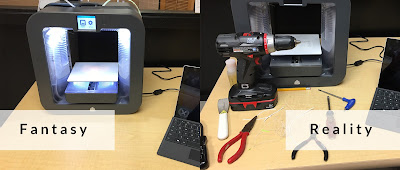
So, I wanted to share my reflections on my first month with a 3d printer. I recently wrote about our experiences choosing, ordering, and setting up a 3d printer here at Spring Grove Middle School. I'd like to share some thoughts with you for the good of the cause on what having a 3d printer is like "in real life" (IRL). If you're considering adding a 3d Printer, these are some ideas, experiences, thoughts, and issues you might want to consider. Know you will have issues  3d Printing is not ready for prime time. No matter what mainstream manufacturers would want you to believe, 3d printing is for makers and enthusiasts. It is not a seamless, out-of-the-box plug-and-play casual consumer experience. You can buy the "Fisher Price" of 3d printers and still end up tearing stuff apart and fixing it on a regular basis. Have tools, and be prepared to use them. Unfortunately, the fantasy & the reality of owning a plug-and-play 3d printer didn't line u...
Three tools to step up design in your classroom...

Image
Even if you know nothing about design! Designed in Canva... in 1 minute. Okay, graphic design is a classically snobbish topic in most of our minds, and historically most of our students really had little opportunity to experience it or interact with it. Today, we live in a visual landscape that is constantly getting more competitive. Everyone has a connected device, including most of our students. They see great design all day on web sites, apps, user interfaces, advertisements, and even E-cards from their middle school bae. The visual elements of most of our classrooms, though, from educational / inspirational posters to handouts to our Power Point Presentations (do people still use Power Point to make presentations?) look like amateurish garbage made by a well meaning but under-skilled octogenarian trying to design a bake sale flier for the local Rotary club. We can get away with die cuts, glitter, and Karen's Kids clip art until about fourth grade. Soon, though, kids are...

The Paradox of Choice in 3d

Image
I recently found myself in the very lucky situation of needing to select a 3d Printer to purchase for my students. I know right? I was pretty stoked, too. Then things went quickly from giddy anticipation to confusion and eventually to paralysis. You see, there are a lot of choices out there, and I mean, a lot. Go ahead, Google " 3d Printer ". Asking around MakerBot Replicator Mini-Essentials I spoke to folks in my IT department, at the high school, and some neighboring districts. Back when everyone was getting on the initial bandwagon, they were getting MakerBot brand printers. I decided to check out their web site, and I was pleased to find that they had apps for iOS  (we are a 1 to 1 iPad building), and a package for their entry level printer, called Replicator Mini Essentials, which included the MakerBot Replicator Mini Compact 3D Printer, a Smart Extruder (I had no idea what this is or what it was for), and a 10 Pack of MakerBot PLA Filaments. This seemed l...

STEM Video Game Challenge: A Quick Start Guide

New post on the Gamestar Mechanic Teacher Blog: STEM Video Game Challenge: A Quick Start Guide Go check it out!

Designing Fun: New post on Gamestar Teacher Blog

Hello friends, It has been awhile. I do have some new posts in the editing queue for this blog, but for my most recent post, go check out: Designing Fun: There’s more to game design than programming It is posted over at the Gamestar Mechanic Teacher Blog . A big thanks to the folks at Eline Media for the opportunity to blog for them. 

Infographic: Cognitive Flow & Game Design

Image
Here's an infographic I made for my game design students and future blog posts because I didn't like any of the graphics currently available. I'm open to improvement suggestions. I used Easel.ly https://s3.amazonaws.com/easel.ly/all_easels/13957/Flow/image.jpg Edtech tweeps, if you're writing about Game-Based Learning, Gamification, or Game Design, and you want to use this in a post, permission granted. If you have ideas on how it could be better, comment below or hit me up on Twitter .

STE[a]M, App Flows, and Common Sense.

Image
A few months back, I did a series of posts titled, "Hey computer teachers, stop wasting students' time". There I laid out the the basic premise that computer class, if it is to have value, should cover Computer Science topics. Hey ,  Computer  Teachers, stop wasting students' time! (Part 1) Hey ,  Computer  Teachers, stop wasting students' time! (Part 2) I wanted to follow those posts up with some really practical posts for computer teachers, particularly those of us from the BCIT certification, who tend to lack of hard-core Information Technology experience. It's easy, after all, to say we need to spend more time teaching students coding, programming, dynamic systems design & analysis, and end-user experience and less time teaching keyboarding, Word, Excel, and PowerPoint, but how do we make that transition? Today I'm going to introduce one tool that is relatively new, but growing quickly in popularity. Common Sense Media App flows Rath...