Posts

Showing posts with the label 21st Century

STEM Video Game Challenge: A Quick Start Guide

New post on the Gamestar Mechanic Teacher Blog: STEM Video Game Challenge: A Quick Start Guide Go check it out!

The promise & reality of GBL in Science

Image
Citizen Science shown in GameUp Though I am not a Science teacher, Science was by far my favorite subject in school. I enjoyed the occasional English class, but Science was awesome. I loved labs in Chemistry, Biology, and Geology. Somehow I missed Physics (probably when I took AP Biology), but I bet I would have loved that too. The sad fact is, that due to shrinking budgets, time constraints, and, at times, facilities constraints, Science class in many schools is less and less about actual science and more and more about textbook reading and information recall. This is where games and simulations are coming in to fill the gaps. I get that a game is never going to replace real research and lab work, but it is certainly a better substitute than worksheet packets. My school building has added two new Science teachers for next year. I would love to be able to share some great game based learning resources with them. That got me thinking, what would I recommend? What's out there...

Better classrooms by design

Image
Classroom design is a topic I just can't stop thinking about. My regular readers will know that I'm a bit obsessed with all things design. Being such a grid-loving, whitespace-promoting, typeface-discerning, color-monitoring design-nerd has caused me to begin to notice how poorly we've designed our learning spaces. It has taken me so long to get to this topic because my primary readers are teachers. As teachers, I feel, we have the least control over how our classrooms are designed. We have no control over the size and shape of our room. We can't paint. We can't change or add lighting. We can't even pick our furniture. If you're a computer lab teacher, like me, you are even more limited, particularly if your room was designed with drop poles  (Mine are rammed right in the center of my room).  There are, however, a few things we can do and can stop doing , right now, to improve the environment of our classroom. The Problem with Classroom Design Ev...

Why you hate group work.

Image
Collaboration, it's one of the 21st century skills. There's pretty much unanimous agreement among policy-makers, academic thinkers, and business leaders that collaboration must be a crucial part of our classrooms. Incidentally, there is almost unanimous agreement among teachers and students that group work is painful, cumbersome, annoying, and largely counter-productive. Even popular reality  shows rely on group assignments to weed out contestants and create unnecessary drama. Why is something that is so important and crucial to our survival, so painful and dreadful? How can we make it more awesome? What do we do with collaboration? Part 1: Why you hate group work. Before our winter holiday break, I informally polled students in my classes. In all of my sections but one, 100% of my students noted that they hate doing group work. In one class two students said that they love group assignments because they can usually con their group mates into doing all of the work. Wh...

Gamestar + Gamekit Beta = Awesome

Image
21st Century Skills... why game design? I've been using game design for the last couple of years to increase the application of " 21st Century Skills " in my class. The actual curriculum of my course is focused on the ISTE NETS , my official standards, and the Pennsylvania  Computer Information Technology Standards for grades 6-8 . My goal in teaching and assessing those skills, though, is to provide a context including as much STE[A]M focused content as possible and as many opportunities as I can for students to practice the  21st Century Skills . Game Design is concerned with studying the concepts behind the basic elements of a game, and how the balance of fun and challenge in games creates flow. It is also concerned with the iteration feedback loop and how games are a complex system designed around creating a satisfying user experience. Game design is a great jumping off point for introducing STEAM (Science, Technology, Engineering, Art and Math) learnin...

Leveling up: Best beginner tools for taking game design to the next level in the classroom?

Image
This is not a guide. This is a conversation. Hopefully the comments on this post will be more useful than my ramblings. With that said, let me hit you with the premise. The Premise Game design is a great jumping off point for introducing STEM (Science, Technology, Engineering and Math) learning through the lens of systems-thinking and user-centered design while stopping short of providing any real foundation in coding, programming, or engineering, areas covered in the realm of game development . I would like to find a way to begin the transition from game design to game development in my classroom, in order to move from STEM theory (ideas and concepts) to STEM skills (concrete practice). Some rights reserved  by  artnoose Game Design is concerned with studying the concepts behind the basic elements of a game, and how the balance of fun and challenge in games creates flow. It is also concerned with the iteration feedback loop and how games are a complex system des...

Hey, Computer Teachers, stop wasting students' time! (Part 2)

Image
In my previous post , I argued that mandatory computer courses, particularly on the secondary level (7th grade and beyond) should move beyond a myopic focus on  keyboarding  and  Microsoft Office .  I did note that a curriculum steeped in keyboarding and productivity applications is quite appropriate and often essential at the 2nd through 5th or even 6th grade levels. By grade 7, though, if we're not moving students forward and addressing the actual standards for our grade level, rather than reiterating elementary school, we're doing our students a serious disservice. In that post, I promised a Part 2 that would share ways that you can "transform your computer classroom into a relevant, standards-compliant, juggernaut of 21st Century STE[A]M-tastic awesomeness." Talk about over-promising! Okay, I'll do my best. On to glory... Beginning with the end in mind. If you don't know where you're going, you'll never get there. This is why we have object...

Hey, Computer Teachers, stop wasting students' time! (Part 1)

Image
Despite increased globalization; despite the need to prepare students to access, evaluate, synthesize, and build upon information and media; and despite the drive to promote Creativity, Innovation, Critical Thinking, Problem Solving, Communication, and Collaboration, the curriculum of many schools' secondary Computer Information Technology programs tends to hinge on keyboarding and Microsoft Office . Let me explain, for those who are not already with me, why this is a waste of our students' time and our parents' taxpayer dollars. There are a growing number of voices clamoring to get rid of the "Computer Teacher", arguing that in today's atmosphere of integrated technology we are irrelevant and redundant. If we're teaching 7th to 12th graders Keyboarding and MS Office classes, that is 100% true. Don't get me wrong, a curriculum steeped in keyboarding and productivity applications is quite appropriate and often essential at the 2nd through 5th or ev...

Why learn game design?

Image
See also: Designing Fun: There’s more to game design than programming  - on The Gamestar Mechanic Teacher Blog. The context Why are we learning game design? I asked my seventh grade students this question last week. On page 61 of "The Framework for Teaching Evaluation Instrument", it is noted that in a classroom that reflects distinguished instruction, students should be able to identify what is going on and why. " If asked, students are able to explain what they are learning and where it fits into the larger curriculum context " (Danielson, 2013). I provide some context for this on a regular basis by reviewing objectives and broader essential questions and standards. Gamestarmechanic.com focuses on the game design process. My students, though, are thinkers. I'm trying to foster that. They really want to know, "why are we learning game design". Many of them did exactly what I would want them to do when given a discussion question like this...

Awesome videos to inspire epic classrooms

Image
Okay, so I realize that everyone and their sister, at this point, has posted their own curated roundup of videos on Game Based Learning and Gamification in the classroom. I'm certainly not doing anything new here. Occasionally, though, I want to share with a colleague or fifty, during workshops or conferences, my cannon of inspirational videos of gaming goodness. It's just more simple to put them all in one place, so here they are. Ultimately, these videos speak for themselves. I'll keep my commentary to a minimum. I will say that these videos actually started me down the path of actually taking games and game design seriously in my classroom. If I hadn't seen Chellman & Mcgonigal's TED talks one fateful day in 2011, I never would have attended break out sessions on games and gamification with Jeff Mummert at the first Tech.it.u or taken an online course called, " Simulations and Gaming Technologies for the Classroom ". I certainly wouldn't be...

New Project in Process: Coding & Programming

Image
I'm working on a two new posts dealing with my Game Design, Game Based Learning, & Gamification Adventures. They should be rolling out next week. Meanwhile, I've been thinking a lot about Coding & Programming thanks to this video: As a result, I developed the project below for my classes. I could use ideas or feedback on: Adding more Gamification elements. Scope and Sequence issues. Providing better resources. Also, I would like to offer it up to any other CIT teachers out there who are interested. Come along for the ride. We can try this together. Project Wiki (feel free to contact me about joining). Edmodo Group for this project (Send me a message if you send a join request) My Class Website (if you're interested in stealing ideas from my other projects) Hope to hear from you soon.

Grades: Gamification, ABI, & PBL

Image
Thoughts on learning, grading, gamification, and motivation from a n00b . I'm just wrestling with these ideas. Conversation is more than welcome. Games & Gamification: Addictive vs. Additive  When the concept of Gamification is mentioned to most teachers, the reaction is neutral at best. I'm sure many people are visualizing trying to turn their subject matter, which they take very seriously, into something resembling Dungeons & Dragons meets Angry Birds. I'm not saying that's good bad or indifferent (See my earlier posts on games). There are others who would (legitimately so) argue that great games function a lot like great teaching. Therefore, Gamification is just a gimmick and really just good teaching. For an example, see the below graphs on "Flow" (a key concept in game design) and Vygotsky's Zone of Proximal Development (educational psychology). Flow: A key Concept in Game Design Zone of Proximal Development...

Epic Tale or Epic Fail: Designing User-centric narrative experiences in Gamestar Mechanic

Image
As mentioned in earlier posts, I've been using Gamestar Mechanic to facilitate technology fluency and systems based thinking in my Computer Information Technology class. Game Design, GBL, & Teaching with Portals Projects, Paradigms, Preconceptions & Survival?? The following activity, developed with the help of several of my students, is appropriate for lessons in game design, plot development, user-centric design, and creative writing, among other things. As mentioned in earlier posts, designing a balanced game, one with flow, involves system-based thinking, problem solving, collaboration, art, storytelling, and digital media literacy. It involves "Systems-Thinking" and "User-Centered Design". To develop even a simple game, a student must act as sociotechnical engineer , thinking about how people will interact with a system and how said systems shape both competitive and collaborative social interaction. This is the 21st Century Story Telle...

Game Design, Game Based Learning, & Teaching with Portals

Image
Getting there (a not-so-brief introduction) About two years ago now, I started down the path of actually taking games and game design seriously in my classroom. This is a topic, I've been thinking about since 2008, when I read Dennis Southwood’s article, “ It's Not Just a Game—It's Skills for Life” from Educators' eZine. From 2008 to to 2011 I built a CIT class around the idea of Applying computer skills in Project Based Learning. It was marginally successful, but I still wasn't getting the results I wanted with at least half of my students, in terms of engagement, deep thinking, & over technology fluency . In 2011, I attended the first Tech.it.u , spending a lot of time in break out sessions with Game Based Learning & Gamification expert, Jeff Mummert . I also took a course from PLS called, "Simulations and Gaming Technologies for the Classroom™ Online". During this time I read What Video Games Have to Teach Us About Learning and Liter...

Design Matters Part 3: Typography

Image
It's taken me a long time to get to this post for two reasons. Number one, The first half of the school year was insane, and as you know were all busy. I'm also teaching an online class and am the adviser of the yearbook, which makes it doubly insane. Enough of the excuses. The other reason is because this is a tough topic to talk about, and it seems rather picky and somewhat overly particular, maybe excessive on my part... It's just something that I believe in, and I want to share with you. Why? I think that it could really help the overall look of your classroom and how seriously your students take your classroom. So, this design matters is first of all directed at you, the teacher. I'll of course eventually show how it also has applications to your students as well... Typography is one of those big $.50 words in graphic design. It deals with all aspects of how designers deal with type and text. For the purposes of this post and to simplify it, we'll narrowly fo...

Approaching the start of a new year...

Image
Okay peeps and tweeps, it's time for this year's round-up of inspiration and wholesome challenging goodness for the start of the school year. This is when I share who / what is challenging me right now with you... kind of an annotated bibli blog raphy of awesome. Are your students totally Psyched? Okay, maybe they're not, but they should be. If you're a teacher, and you're not a Vlog Brothers fan (or a Nerdfighter like me), you may have missed this. I'm posting it here for you to share with your friends, colleagues, administrators, and, most importantly, your students. DFTBA An Open Letter to Students Returning to School John Green Room Readiness Ahhh... Room readiness. No matter what your district calls it, you probably have to go set up your junk this week or next week. What are you going to do differently? What will you keep the same? What is your core message? ...WHAT? I thought we were talking about room setup, not an essay or lecture. This yea...

Design Matters Part 2: You don't have to be an Art teacher...

Image
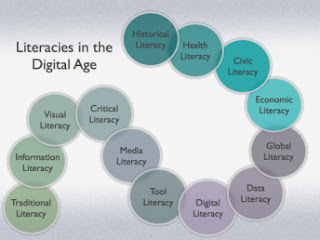
This is part 2 of my Design Matters series. If you missed part 1, you can check it out here . In this post, I'll focus on little ways you can encourage better overall visual literacy in your classroom. We'll talk about why you should and how you can. I'll include the first set of three simple tricks to improve design in your classroom. I'll add three more in the next post in this series and so on. On to glory...   Visual literacy beyond the Art room First, I am not an art teacher. For the most part, the fine arts are a bit lost on me. I wish that weren't true, but it is. I may not appreciate a Picasso, nor can I tell it from a Rembrandt. I can, however, appreciate the design around me. I can instantly tell a Mac from any PC. We're surrounded by great design daily. A quick visit to the mall or The Dieline , will quickly cement that idea. Most of us know great design when we see it. We don't have to know fine art to be visually literate. Also, it'...

Design Matters 1: Visual Literacy & the 21st Century

Image
It's the big day. Your students have been working on these projects for weeks. Some groups, going the traditional route have prepared a Power Point presentation. Some have made a VoiceThread or Animoto . A few brave groups have used Weebly , Blogger , or Wix to create a whole web site. Rubrics in hand, the day begins. Your hard work has paid off... mostly. Your students are proud of their work. The content has unusual depth. The students have met the expectations outlined on your rubric. Still... something is wrong. The projects are... well... they're ugly. You have this sick feeling knowing that they're out there on the web, pointing back at your class. This feeling makes you feel a little guilty. After all, "ugly" is very subjective, and they're only kids, kids who have worked very hard. What a shallow and superficial person you must be! Maybe you're just out of touch. Maybe cobalt blue text (in Jokerman font) on a black background with red and neon...

Projects, Paradigms, Preconceptions & Survival??

A brief survey of the stuff that is coloring my decisions this 9 weeks in class & another plea for online community for my students... Paradigms, Context, & Survival... Now it's video clip time. I just want to share with you a bit of the context in which my thinking has been framed lately, before I talk about why I'm blowing up my curriculum and pursuing things that are driving me crazy. Many of you have seen this stuff before. If you haven't, watch these. They're good for you, like fiber & anti-oxidants all rolled into one delicious sweet roll: Sir Ken Robinson. Diane Ravitch - This video reminded me of  this article , which came across my Flipboard the other day, thanks to my awesome PLN... ( supplemental reading )   Jane McGonigal Projects, PBL, and Online Community One of the awesome things about being Middle School BCIT instructor is the freedom I have to teach a skills based cu...

Yes, Another PLN Post...

Image
Yeah, there are a hundred or so PLN posts out there. Here's another one. Why? I'm presenting this stuff at an in-service, and I couldn't find all of this stuff in one place. I decided to compile it all on our district web page. Here are the fruits of my labor. My slide deck for the presentation... What is a PLN? Personal Learning Networks, or PLNs, are the collegial relationships you have with peers. Originally, they were your family and friends, maybe other educators you worked with, but thanks to the internet and web 2.0 tools have become much much larger. PLNs can now include myriad communities, including but not limited to social networking sites like Facebook, blogs, Twitter, wikis, social bookmarking tools, LinkedIn, Goodreads, and Ning. n. – the entire collection of people with whom you engage and exchange information, usually online. ( http://bit.ly/Klingensmith )  How to build it Twitter (not just for breakfast anymore) Okay, so maybe...