Posts

Showing posts with the label Design Matters

RIP: Apps and initiatives that are no longer with us.

Image
Okay, I'm going to need you to bear with me while I rant a little bit, whine some, and cry out for help and advice. Engaging Middle School students is hard, even in the computer lab. Most of the garbage out there that is marketed to teachers, particularly in the technology department, is not only teaching antiquated skills, but is also incredibly " edukitschy ". Every once in awhile you find a gleaming diamond in the rough that is awesome and free. This rarely happens for teachers, and when it does, it becomes all the more heart-breaking when it suddenly goes away. Sometimes we only get to greet these things at a distance, and due to our circumstances never get to enter the promised land before the world has moved on.    Project Spark Project Spark was a game creation / simple programming environment for Microsoft Windows 8.1, 10 and Xbox One, which was the very beautiful child of it's homely parent, Kodu. Kodu is a visual programming tool which builds on i...
Three tools to step up design in your classroom...

Image
Even if you know nothing about design! Designed in Canva... in 1 minute. Okay, graphic design is a classically snobbish topic in most of our minds, and historically most of our students really had little opportunity to experience it or interact with it. Today, we live in a visual landscape that is constantly getting more competitive. Everyone has a connected device, including most of our students. They see great design all day on web sites, apps, user interfaces, advertisements, and even E-cards from their middle school bae. The visual elements of most of our classrooms, though, from educational / inspirational posters to handouts to our Power Point Presentations (do people still use Power Point to make presentations?) look like amateurish garbage made by a well meaning but under-skilled octogenarian trying to design a bake sale flier for the local Rotary club. We can get away with die cuts, glitter, and Karen's Kids clip art until about fourth grade. Soon, though, kids are...

The Paradox of Choice in 3d

Image
I recently found myself in the very lucky situation of needing to select a 3d Printer to purchase for my students. I know right? I was pretty stoked, too. Then things went quickly from giddy anticipation to confusion and eventually to paralysis. You see, there are a lot of choices out there, and I mean, a lot. Go ahead, Google " 3d Printer ". Asking around MakerBot Replicator Mini-Essentials I spoke to folks in my IT department, at the high school, and some neighboring districts. Back when everyone was getting on the initial bandwagon, they were getting MakerBot brand printers. I decided to check out their web site, and I was pleased to find that they had apps for iOS  (we are a 1 to 1 iPad building), and a package for their entry level printer, called Replicator Mini Essentials, which included the MakerBot Replicator Mini Compact 3D Printer, a Smart Extruder (I had no idea what this is or what it was for), and a 10 Pack of MakerBot PLA Filaments. This seemed l...

Better classrooms by design

Image
Classroom design is a topic I just can't stop thinking about. My regular readers will know that I'm a bit obsessed with all things design. Being such a grid-loving, whitespace-promoting, typeface-discerning, color-monitoring design-nerd has caused me to begin to notice how poorly we've designed our learning spaces. It has taken me so long to get to this topic because my primary readers are teachers. As teachers, I feel, we have the least control over how our classrooms are designed. We have no control over the size and shape of our room. We can't paint. We can't change or add lighting. We can't even pick our furniture. If you're a computer lab teacher, like me, you are even more limited, particularly if your room was designed with drop poles  (Mine are rammed right in the center of my room).  There are, however, a few things we can do and can stop doing , right now, to improve the environment of our classroom. The Problem with Classroom Design Ev...

Teachers, Let's fix this PowerPoint thing

Image
“PowerPoint doesn’t kill meetings. People kill meetings. But using PowerPoint is like having a loaded AK-47 on the table: You can do very bad things with it.” Peter  Norvig , Google Director of Research I'm going to take a break from talking about games and project-based learning and focus instead today on design. Specifically, I want to talk about a tool that is in most of our boxes these days: presentation software. You know, PowerPoint, Google Presentation, Impress, Keynote, Empressr, etc. We all use it to teach. Many of us use it as a tool for student projects. Most of us love it and hate it. In most circumstances, presentations are fun to make, awkward to give, and terrible to watch. What's going on? Show & Tell The main key here is Show & Tell . The presentation tool shows and you tell. My Show & Tell notes on my new murse. I often illustrate this point by having my students access prior knowledge of Show & Tell with a think-pair-share. Stud...

Design Matters Part 3: Typography

Image
It's taken me a long time to get to this post for two reasons. Number one, The first half of the school year was insane, and as you know were all busy. I'm also teaching an online class and am the adviser of the yearbook, which makes it doubly insane. Enough of the excuses. The other reason is because this is a tough topic to talk about, and it seems rather picky and somewhat overly particular, maybe excessive on my part... It's just something that I believe in, and I want to share with you. Why? I think that it could really help the overall look of your classroom and how seriously your students take your classroom. So, this design matters is first of all directed at you, the teacher. I'll of course eventually show how it also has applications to your students as well... Typography is one of those big $.50 words in graphic design. It deals with all aspects of how designers deal with type and text. For the purposes of this post and to simplify it, we'll narrowly fo...

Design Matters Part 2: You don't have to be an Art teacher...

Image
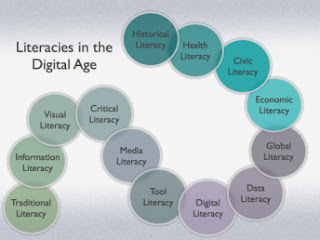
This is part 2 of my Design Matters series. If you missed part 1, you can check it out here . In this post, I'll focus on little ways you can encourage better overall visual literacy in your classroom. We'll talk about why you should and how you can. I'll include the first set of three simple tricks to improve design in your classroom. I'll add three more in the next post in this series and so on. On to glory...   Visual literacy beyond the Art room First, I am not an art teacher. For the most part, the fine arts are a bit lost on me. I wish that weren't true, but it is. I may not appreciate a Picasso, nor can I tell it from a Rembrandt. I can, however, appreciate the design around me. I can instantly tell a Mac from any PC. We're surrounded by great design daily. A quick visit to the mall or The Dieline , will quickly cement that idea. Most of us know great design when we see it. We don't have to know fine art to be visually literate. Also, it'...

Design Matters 1: Visual Literacy & the 21st Century

Image
It's the big day. Your students have been working on these projects for weeks. Some groups, going the traditional route have prepared a Power Point presentation. Some have made a VoiceThread or Animoto . A few brave groups have used Weebly , Blogger , or Wix to create a whole web site. Rubrics in hand, the day begins. Your hard work has paid off... mostly. Your students are proud of their work. The content has unusual depth. The students have met the expectations outlined on your rubric. Still... something is wrong. The projects are... well... they're ugly. You have this sick feeling knowing that they're out there on the web, pointing back at your class. This feeling makes you feel a little guilty. After all, "ugly" is very subjective, and they're only kids, kids who have worked very hard. What a shallow and superficial person you must be! Maybe you're just out of touch. Maybe cobalt blue text (in Jokerman font) on a black background with red and neon...